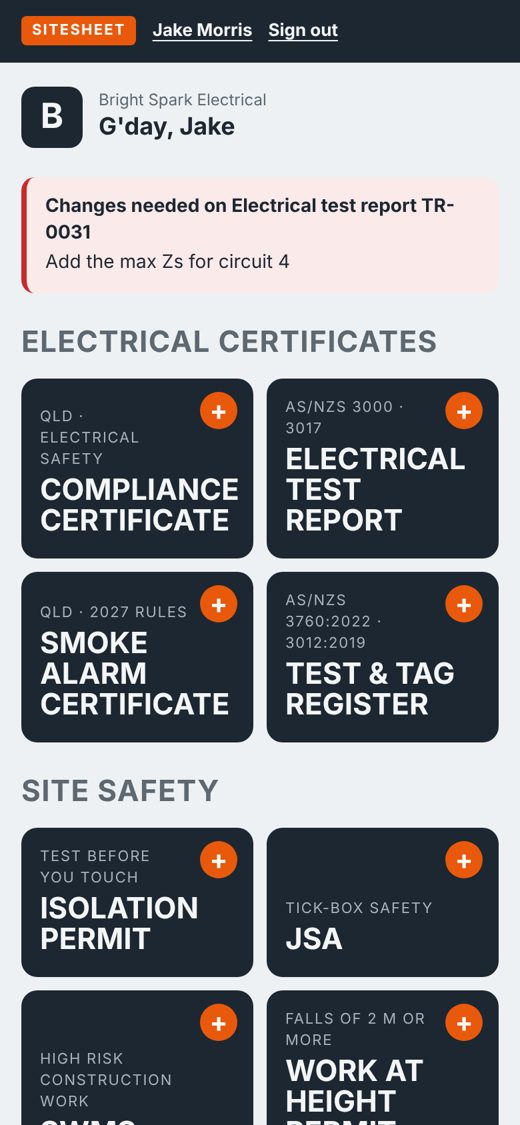
Every form a sparky fills in
Your logo, ABN and licence numbers print on every form. Your details and your test instrument fill in automatically.
Electrical certificates
- Certificate of testing and complianceInstallation (s229) or equipment (s208) wording, created from your test report in one tap.
- Electrical installation test reportVisual inspection, earthing, insulation, polarity, connections, EFLI and RCD trip times.
- Smoke alarm compliance certificateCurrent and 1 January 2027 rules, replace-by dates, tenancy and sale details.
- Test and tag registerBrand, class, readings and next test date worked out for construction sites.
Site safety
- Isolation and lockout permitEvery isolation point, lock and tag, test before you touch, and restoration.
- SWMSHigh risk construction work, prefilled electrical tasks, controls, review log and sign-on.
- JSATap the hazards and PPE, add the job steps, and the crew signs on the phone.
- Work at height permitFall protection, rescue plan, EWP licence check and overhead line exclusion zones.
Site to office to customer
Fill it in
Tap through on your phone, even in a ceiling with no signal. Sign with your finger and add photos.
Check it
Every form saves to the office dashboard as you type. They can review it, or send it back with a note.
Send it
A branded PDF goes to the customer, agent or builder, with a copy to the office for your records.
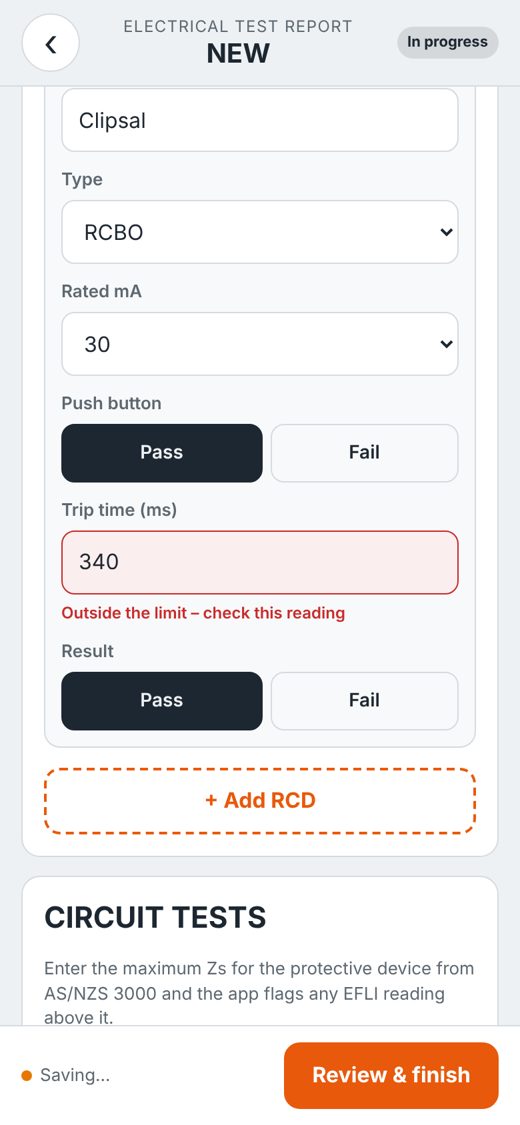
Spots a bad reading before your customer does
Readings outside the usual limits turn red on screen and on the PDF, so an apprentice can't miss one. A form can't be emailed until its required fields are filled in.
- RCD trip times, insulation resistance and main earth
- EFLI checked against the max Zs you enter for each circuit
- Required fields flagged before sending
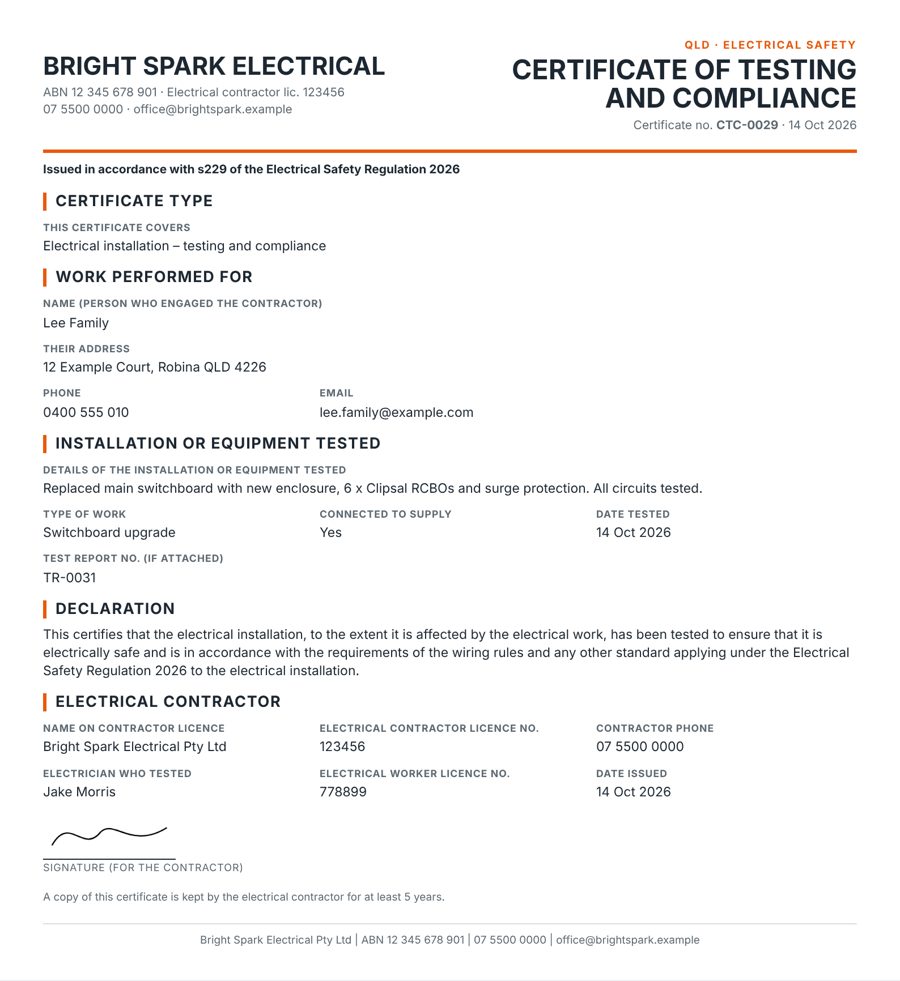
Test report to certificate in one tap
Finish the test report and SiteSheet starts the compliance certificate with the customer, address, licence numbers and report number already filled in. Check it, sign it, send it.
- Previous customers fill in their own address and phone
- Smoke alarm replace-by dates from the manufacture date
- Test and tag due dates from the item category
The 2026 regulation changed your certificate
The Electrical Safety Regulation 2026 replaced the 2013 Regulation on 1 September 2026, with new section numbers. SiteSheet's certificate follows WorkSafe Queensland's own example certificate.
"Issued in accordance with s229 of the Electrical Safety Regulation 2026"Printed on every installation certificate. Equipment certificates cite s208.
One price, every form
Prices include GST. Unlimited forms. Cancel any time.
Solo
- One user
- All eight forms
- Branded PDFs and email sending
- Works offline
Team
- Up to 5 users, then $9 a month each
- Office dashboard for the whole team
- Send back for changes, roles and permissions
- Everything in Solo
14-day free trial with every feature, no card needed. Founding prices apply to monthly plans while the first 50 places last. Annual plans are $250 (Solo) and $490 (Team), plus $90 a year per extra user.
Before you sign up
Does it work without signal?
Yes. Forms save on your phone as you type and sync to the office as soon as you're back in range. Emailing a PDF needs signal.
Do I need to download an app?
No. Open app.sitesheet.com.au on your phone and add it to your home screen. It opens like any other app, on iPhone and Android.
Who is responsible for the certificate?
You are, as the licensed electrician and contractor. SiteSheet records your results and sends the document. It doesn't inspect or test anything, and the limits and checks in the app are guides only.
Is it only for Queensland?
The certificates follow Queensland requirements. The safety forms (SWMS, JSA, permits) follow the national model work health and safety laws. Other states' certificates are planned.
Can my office see what the team fills in?
Yes. On the Team plan, everyone in the office sees every form as it's filled in, can send it back for changes, and can email it on. Field staff only see their own forms.
What happens to my forms if I cancel?
You can still sign in and download them for 12 months. Sent forms can't be deleted from inside the app, because certificates need to be kept for at least 5 years.
Can I move from Solo to Team later?
Yes, any time from Billing. Stripe adjusts your next invoice for the time already paid.
Try it on your next job
Set up takes two minutes. Add your logo and licence, then fill in your first certificate on site.
Start your 14-day free trial